


Infographic Ideas for Ecommerce Stores That Help Sell
Most store owners treat infographics as a “nice to have” for social media. That’s a missed opportunity. A good infographic answers a question a shopper would otherwise have to hunt for, and shoppers who find answers quickly tend to buy.
This guide skips the theory and focuses on one thing: what to make, where to use it, and how to get SEO value from it.
What an Ecommerce Infographic Should Do
Before picking a format, ask one question: what doubt is stopping someone from buying?
Maybe they can’t tell which size fits. Maybe your product looks like three others. Maybe they don’t know how long shipping takes. An infographic is just a fast way to remove that doubt. If it doesn’t answer a real question, it’s decoration, and decoration rarely moves sales.
12 Infographic Ideas, Grouped by Where the Customer Is
Stage 1: Customer is still researching
1. The “how to choose” guide
Turn your buying advice into a one-page visual. A coffee seller might map grind size to brewing method. A skincare brand might map skin type to ingredient. Put it on a category page or blog post.
2. The comparison chart
Show how your product types differ: material, price range, best use. Keep it honest. Shoppers spot spin quickly, and a fair comparison builds more trust than a one-sided one.
3. The myth-vs-fact graphic
Every niche has common misconceptions. Clearing them up shows expertise, and these graphics tend to get shared more than product images.
4. The problem-to-solution flow
Start with the customer’s problem (“my sofa fabric pills”) and walk through what causes it and what fixes it, ending with the relevant product. It reads like help, not a pitch.
Stage 2: Customer is on your product page
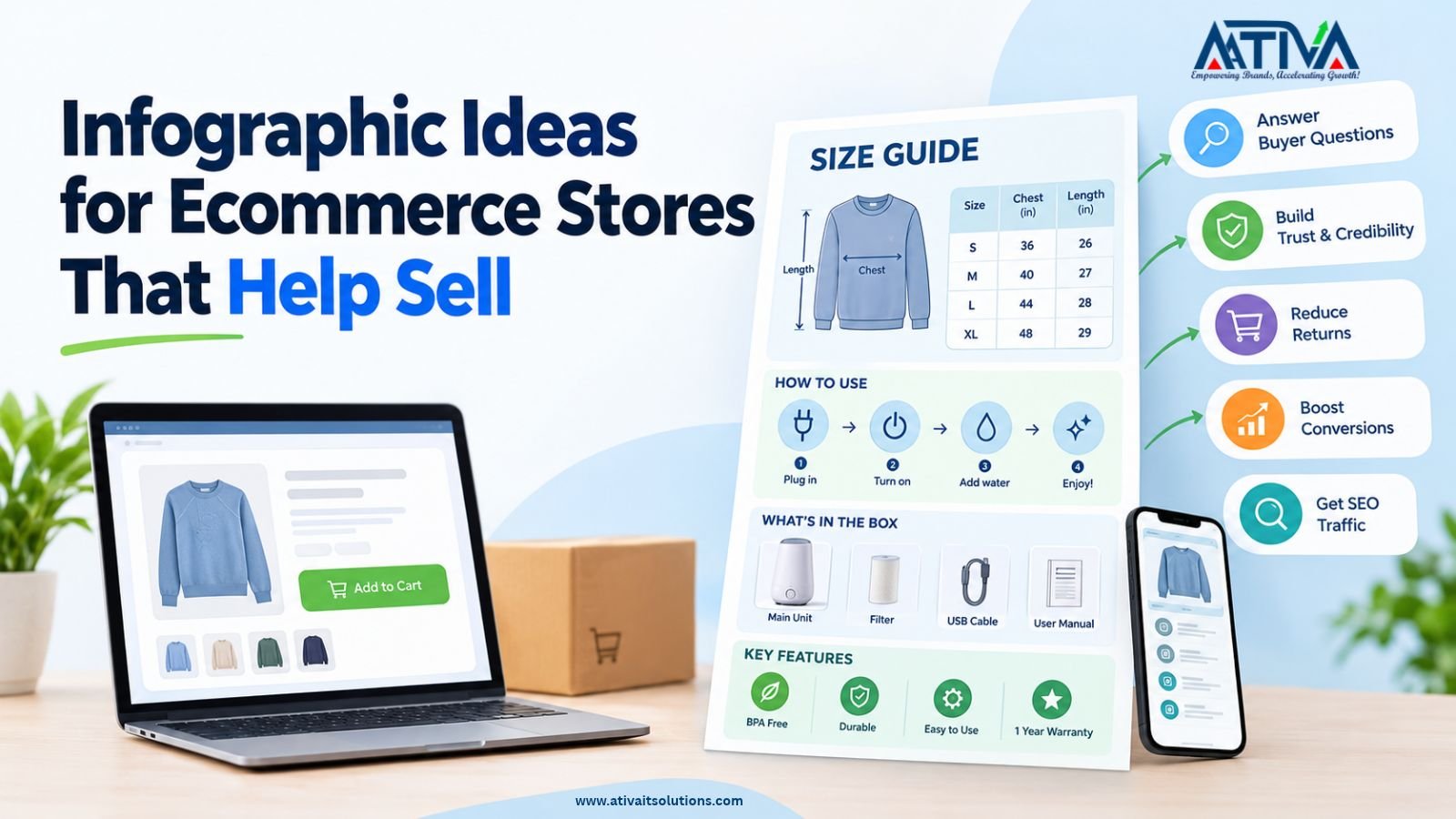
5. The size and fit guide
Probably the highest-value infographic for clothing, shoes, furniture and anything that gets returned for “not what I expected.” Show real measurements, how to measure, and a simple chart.
6. The “what’s in the box” graphic
Lay out everything the buyer receives, with labels. It reduces “I didn’t know it didn’t include batteries” complaints.
7. The how-to-use or setup graphic
Three to five steps with icons. This works especially well for products with any learning curve: appliances, tools, supplements, tech accessories.
8. The ingredients, materials or specs breakdown
Pull out the details people actually care about (fabric content, certifications, dimensions) and present them visually instead of in a dense paragraph.
Stage 3: Customer is about to check out
9. The shipping and returns timeline
A simple “Order placed, packed in 1 to 2 days, delivered in X days, return within Y days” strip answers the question that causes the most cart abandonment. Use your real timeframes only.
10. The sourcing or making-of story
If how you make or source your product is a selling point, draw it. Fewer words, more steps. Skip it if it isn’t a real differentiator.
Stage 4: Customer has bought (or you want others to find you)
11. The care and maintenance guide
A printable card or post-purchase email graphic. It cuts support tickets and gives customers a reason to keep your brand around.
12. The data or trend graphic
Original numbers from your own store, such as “what our customers bought most this season” or “average delivery time by region.” Original data is what earns links and press mentions, because other sites can cite it.
A Simple Brief You Can Reuse
Before you design anything, fill in this brief. It takes five minutes and prevents most revisions:
- Question this answers: (one sentence)
- Who it’s for: (first-time buyer, repeat customer, press)
- Where it will live: (product page, blog, email, Pinterest, Instagram)
- The one thing to remember: (a single takeaway)
- Data or facts needed: (and where they come from)
- Call to action: (view product, download PDF, read the full guide)
If you can’t fill in the first line, don’t make the infographic yet.
Design Basics That Matter
You don’t need a design team. Canva, Figma and Adobe Express all handle this. These rules matter more than the tool:
- One idea per graphic. If it needs a long explanation, split it into two.
- Readable on a phone. Most shoppers will see it on a small screen. If the text is tiny at phone width, it’s too small.
- Limit your fonts and colors. Two fonts and a few brand colors keep it clean.
- Leave breathing room. Empty space isn’t wasted space.
- Use real numbers. “Ships fast” says nothing. “Ships in 2 business days” says something.
- Make versions for each platform. A tall format (for example, a 2:3 ratio) suits Pinterest, while a 4:5 portrait works well for Instagram carousels. Reuse the content, resize the layout.
How to Get SEO Value From Infographics
An infographic is an image, and search engines can’t read text inside an image as reliably as live text. So don’t rely on the image alone.
- Add live text around it. Write a short summary and the key points as normal page text, next to the graphic.
- Name the file properly.
shoe-size-guide-mens.png, notIMG_2043.png. - Write descriptive alt text. Describe what the graphic shows in a sentence. Don’t stuff keywords.
- Compress it. Use WebP or an optimized PNG so the page doesn’t slow down. Speed affects both rankings and conversions.
- Give it its own context. Place it on a page that matches the topic, with a clear heading above it.
- Make it easy to share. Offer an embed code or a download link with credit back to your page. This is how infographics earn backlinks.
- Pitch it. If you made original data (idea 12), send it to bloggers and journalists in your niche.
- Consider structured data. Image markup can help search engines understand the page. Ask your developer or use your SEO app.
Infographic pages can also feed AI answers. A page with a clear, text-based explanation and a supporting graphic is easier to summarize than a page that’s only an image.
Mistakes to Avoid
- Cramming too much in. If it takes a minute to read, most people leave.
- Hiding key information in the image only. Always repeat it as text.
- Using stock statistics with no source. If you cite data, link to where it came from.
- Copying a competitor’s layout. Borrowed designs look generic and can cause legal trouble.
- Never updating them. Outdated shipping times or prices hurt trust. Review them every quarter.
- Skipping the CTA. Every infographic should point to a next step.
FAQs- About Infographic Ideas for Ecommerce
1.What makes a good ecommerce infographic?
It answers a real customer question, shows one idea clearly, uses accurate information and matches your brand.
2.Do infographics help SEO?
They can. They earn backlinks when they contain original data, and they improve engagement on a page. But they work best alongside written content, since search engines rely heavily on text.
3.What size should an infographic be?
It depends on the platform. Tall formats work well for blogs and Pinterest, and square or 4:5 portrait works for Instagram. Always test how it looks on mobile.
4.What tools can I use to make one?
Canva, Figma, Adobe Express and Piktochart are all popular. Pick whichever you can use quickly and consistently.
5.How many infographics does a store need?
Start with two or three that solve your biggest customer questions, such as sizing, shipping and how to use the product. Add more once those are working.
6.Can I use AI to design them?
Yes for layout ideas and drafts, but check every fact, number and spelling yourself. Text inside AI-generated images is often wrong.
Want Content That Drives Sales, Not Just Likes?
At Ativa IT Solutions, we help Shopify, Amazon and Walmart sellers build content that ranks and converts. Get a free SEO audit and see what your store pages are missing.